
Cars & Bids
Cars & Bids, LLCAuto & Vehicles
4.867.00 Reviews
- Version
- 26.9
- Installs
- 50.00K
- Age Rating
- Everyone
Screenshots

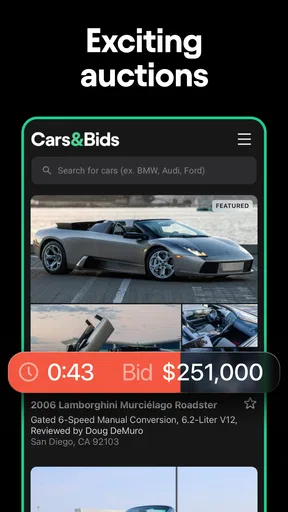
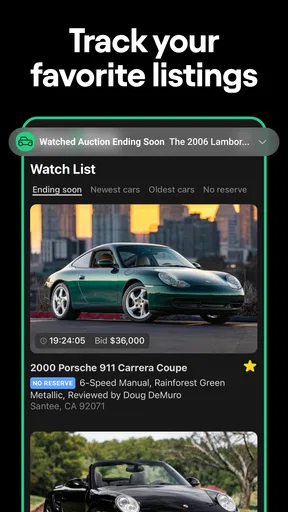
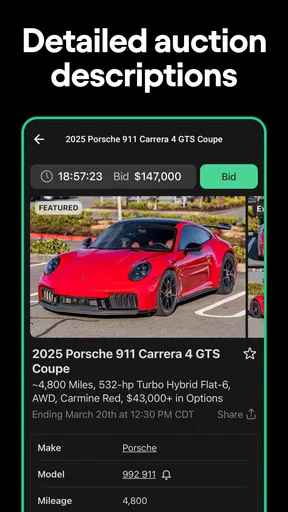
Our Review of Cars & Bids
 Analysis by Appyee
If you enjoy cars and have ever spent an evening comparing unusual trims, checking old listings, or wondering whether a particular enthusiast vehicle is worth pursuing, Cars & Bids is built around that kind of curiosity. I found it more focused than a general classifieds app because its identity is tied to automotive auctions rather than everyday transportation. The app is free to install, and its Everyone age rating makes it easy to explore casually before deciding whether the auction format suits you.
My first impression was that this is not simply a catalog for browsing cars. It is a marketplace where attention matters: you need to study a listing, understand the vehicle, follow the auction activity, and decide whether you are genuinely prepared to participate. That makes it appealing to enthusiasts who enjoy the research as much as the purchase. It is less suitable for someone who only wants the fastest way to find a cheap commuter or arrange a routine test drive.
What to expect when you open Cars & Bids
The app comes from Cars & Bids, LLC, and sits in the Auto & Vehicles category. Its store summary presents it as an automotive auction marketplace for car enthusiasts, which is a fair description of the experience I had in mind while using it. The important distinction is the auction mindset: listings are something to investigate and monitor, not just cards to swipe through until one looks affordable.
I would approach the app with two goals separated from the beginning. The first is discovery: finding vehicles that match your taste, era, body style, or mechanical interests. The second is buying: deciding whether a particular example deserves your money and attention. Keeping those goals separate prevents a common mistake, which is becoming emotionally attached to a car before you have reviewed its details carefully.
The app has a 4.2 average from around seventy ratings and has passed ten thousand installs. That gives it a modest but meaningful footprint rather than the feel of an enormous general-purpose marketplace. I see that as useful context for expectations: this is a specialized destination for people who care about cars, not an app designed to cover every kind of vehicle transaction.
Because it is free, I think the best first session is exploratory. Browse without deciding to bid, note the kinds of vehicles appearing in the marketplace, and pay attention to how much information each listing gives you. A first-time user should learn the rhythm of the app before treating any listing as a serious purchase opportunity.
The auction format changes how you should browse
On a traditional classified platform, I usually begin with a maximum budget, a distance limit, and a practical checklist. Those filters can still shape your thinking here, but an auction adds urgency and competition. A car that seems reasonable at one moment may become a poor decision if the bidding moves beyond the total amount you planned to spend.
I recommend writing down your ceiling before you become invested in a listing. Include the vehicle itself, transportation, inspection, registration, maintenance, and a reserve for surprises. This is one of the most important habits for using an enthusiast auction app: the winning bid is not the same thing as the full ownership cost.
The app is most valuable when you treat each listing as a research project, not as an impulse purchase. That approach also makes the browsing experience more enjoyable. You can appreciate a rare configuration or interesting history without automatically turning admiration into a bid.
Setting up a useful first session
The current version is 26.7.2 and requires iOS or Android 10 or later. On a compatible phone, I would start by installing the free app and allowing myself enough time to read rather than rushing toward participation. The first setup should be about understanding the marketplace and organizing your own buying criteria.
Before looking at individual cars, I would decide what “right” means for you. Are you searching for a weekend project, a modern performance car, a distinctive daily driver, or simply something you want to study? Each purpose changes the questions you need to ask. A project can tolerate cosmetic flaws that would be unacceptable in a daily vehicle, while a daily driver demands closer attention to reliability and practical running costs.
It also helps to create a short personal checklist outside the app. Mine would include the exact model and generation, acceptable mileage, transmission preference, known maintenance concerns, interior condition, and the maximum all-in budget. This prevents the listing itself from defining your standards. Enthusiast marketplaces are good at making an unusual car feel uniquely important, so an external checklist keeps the decision grounded.
When browsing, I would save or revisit candidates only after checking whether the vehicle actually fits that checklist. Do not use every interesting car as a reason to expand your criteria. A better workflow is to keep a small shortlist and compare those vehicles directly in your notes. Record the questions you still need answered, rather than relying on memory after viewing several auctions.
How to read a listing like a buyer
I pay attention to consistency more than presentation. A clean-looking set of photos is helpful, but it should not replace questions about condition, ownership history, maintenance, modifications, and current faults. Look for details that connect the written description with the images. If the description suggests careful ownership but the photos show neglected areas, that mismatch deserves attention.
For an older or modified vehicle, I would separate original equipment from later changes. Modifications can be a benefit if they match your intended use, but they can also make future repairs, insurance, inspection, or resale more complicated. A car that appears inexpensive may become less attractive once you price the work needed to return it to dependable road use.
One useful technique is to review the listing twice. On the first pass, I look at the overall vehicle and decide whether it interests me. On the second, I deliberately search for reasons not to buy it. That second pass is where small clues become important: worn controls, inconsistent panel condition, questionable upgrades, or missing context around repairs. Enthusiasm is useful for finding candidates; skepticism is necessary for choosing one.
Questions to resolve before you participate
A first-time user may reasonably wonder whether simply installing the app commits them to anything. It does not turn browsing into buying. You can use the free app to explore the marketplace and learn how listings are presented before deciding whether an auction deserves further action.
You may also wonder whether an auction is better than a normal classified listing. In my view, it is better when the vehicle is distinctive and the history, specification, and enthusiast interest are central to its appeal. A conventional classifieds service is often better when you need a nearby practical car, want to negotiate privately, or need a straightforward purchase timeline.
Another important question is how much research is enough. There is no universal number of minutes or pages that makes a vehicle safe to buy. The right stopping point is when you understand the car’s condition, your likely additional costs, and the consequences of losing the auction. If any of those remain unclear, I would keep researching rather than letting the closing time make the decision for me.
Reaching your first meaningful success
For a new user, a successful first action does not need to be winning a car. I would define it as finding one relevant listing, understanding why it fits your criteria, and building a sensible decision record around it. That gives you a useful result even if you ultimately decide not to participate.
Start with a narrow search in your own mind. For example, you might look for a weekend vehicle from a particular era, then reject anything that exceeds your mechanical comfort level or budget. As you inspect a candidate, write down three things: what attracts you, what concerns you, and what information would change your mind. This turns passive browsing into a repeatable buying process.
Next, compare the listing with ordinary alternatives. Check what similar vehicles cost through general classifieds, dealer inventory, or local enthusiast groups. The comparison is not only about price. A conventional listing may offer an in-person inspection or a simpler negotiation, while an auction may offer a more focused audience and a better environment for a special-interest vehicle. The best choice depends on whether the car’s uniqueness outweighs the convenience of a local transaction.
A realistic example would be someone looking for a second car after work. They spot an appealing performance model, feel tempted to bid immediately, and then remember that the vehicle must also survive a long commute. By comparing the listing against insurance, fuel, tires, maintenance, and transport costs, they may discover that the car is perfect as a weekend hobby but wrong for daily use. That is still a successful outcome: the app helped clarify the purchase rather than merely encourage it.
How I would handle the final stage of an auction
If a listing remains interesting after research, I would set my limit before the auction becomes intense. I would not raise that limit because another participant appears to value the car more highly. Competitive momentum can make a reasonable purchase feel like a personal challenge, and that is exactly when discipline matters most.
I would also keep a written list of unresolved issues beside me while monitoring the auction. If I cannot explain how I would handle a mechanical concern, transport problem, or modification, I would treat that as a reason to pause. The excitement of a closing auction should not erase practical questions that were obvious earlier.
For buyers outside the seller’s area, logistics deserve special attention. Think about how the car will reach you, whether you can inspect it before committing, and what you will do if its condition differs from your expectations. An enthusiast marketplace can help you discover vehicles beyond your immediate neighborhood, but distance can turn a small uncertainty into an expensive problem.
I would also avoid assuming that a strong community atmosphere replaces personal due diligence. Enthusiast buyers may notice details that ordinary shoppers miss, but no marketplace can make every vehicle equally suitable for every owner. The final responsibility still belongs to the person deciding whether the car fits their money, skills, and plans.
Common confusion that can slow down new users
The biggest confusion is treating a listing’s appeal as proof of value. A rare color, desirable badge, or interesting modification can be genuinely important, but those qualities do not cancel out rust, deferred maintenance, accident damage, or poor documentation. I like using the app for discovery, yet I would never let the enthusiast angle replace a mechanical inspection or a realistic ownership budget.
Another source of friction is the difference between a vehicle’s visible condition and its usable condition. Photos can show paint, wheels, seats, and general presentation. They cannot give me the same confidence as seeing how a car starts, drives, shifts, brakes, and behaves when warm. If you are not comfortable evaluating those areas yourself, budget for an independent inspection or bring someone who is.
New users can also confuse a low starting point with a low final cost. Auctions are designed around changing interest, so the figure that first catches your eye may not represent what you will ultimately need to spend. I would use the opening opportunity to decide whether the car deserves research, not to assume it will remain within reach.
There is also a practical difference between browsing on a phone and making a major purchase decision on one. The mobile format is convenient for checking a listing during a break or revisiting it from the sofa, but small screens make it easier to skim. I would move important notes into a larger view or write them separately, especially when comparing several vehicles and their condition details.
One less obvious trade-off is that specialization can narrow your perspective. Cars & Bids keeps the focus on enthusiast vehicles, which is its strength, but that focus may make an ordinary alternative seem less exciting than it really is. If your priority is dependable transportation, a mainstream used-car marketplace, a dealer, or a local private seller may serve you better. The specialized environment is an advantage only when your needs are specialized too.
Who should use it and who should skip it
I would recommend the app to someone who enjoys researching cars, can set a firm budget, and is comfortable with the uncertainty that comes with buying a vehicle through an auction marketplace. It is especially appealing if you are searching for something with character rather than simply the cheapest reliable option.
I would be more cautious recommending it to a first-time car owner who needs predictable transportation immediately. That person may benefit from a local inspection, a conventional negotiation, and a vehicle with an easier service history. The same applies if you cannot absorb unexpected repairs or have no practical way to arrange transport after a purchase.
It is also not the right tool if you dislike watching an auction evolve or feel pressured by deadlines. A normal classified listing may offer a slower conversation and more room to walk away. Cars & Bids makes more sense when the process itself—researching, comparing, and following enthusiast interest—is part of what you want.
My next-step advice after the first visit
After your first session, I would not immediately chase the most attractive listing. Instead, choose one vehicle that matches your criteria and use it as a practice case. Review its photos and description, identify the questions you would ask, compare it with alternatives, and estimate the ownership costs beyond the purchase. This teaches you how to use the marketplace without putting money at risk.
Then create a simple decision rule for future auctions. For me, that would be: no bid without a clear purpose for the car, no bid without a maximum all-in budget, and no bid while important condition questions remain unanswered. Those rules may sound conservative, but they preserve the enjoyable part of enthusiast buying while reducing the chance of an expensive emotional decision.
Keep the app updated as well. The current release is 26.7.2, and using the current version is the sensible way to avoid missing improvements made to the mobile experience. Since the application supports devices running Android or iOS 10 and later, compatibility should be manageable for many users with relatively recent phones.
My overall view is positive, with an important qualification: this is a focused tool for car enthusiasts, not a shortcut around research. I like that its free entry makes it easy to explore, and I appreciate the way an auction marketplace can bring attention to vehicles that would be harder to find through ordinary local listings. At the same time, the format rewards patience, financial discipline, and a willingness to verify details independently.
Cars & Bids is worth trying if the search for an interesting car is part of the fun. I would install it, browse without pressure, build a shortlist, and use the first meaningful success as a well-researched decision rather than a winning bid. For the right enthusiast, that makes the app engaging and genuinely useful; for someone seeking simple, predictable transportation, a conventional vehicle marketplace remains the better choice.
Privacy and Permissions
See what permissions an app requests and how it handles your data.
- Camera
- take pictures and videos
- Other
- view network connections, full network access, run at startup, control vibration, prevent device from sleeping, Google Play license check
Verdict
Strengths of Cars & Bids
- Specialized marketplace for enthusiast and collectible vehicles
- Detailed listings include photos, specifications, and seller descriptions
- Auction format can attract serious buyers and competitive offers
- Community comments may reveal useful history or mechanical details
- Strong focus on modern enthusiast cars and interesting classics
Limitations of Cars & Bids
- Buyer fees add to the final purchase price
- Vehicle condition can vary, so inspections remain essential
- Shipping and registration arrangements are handled by the buyer
- Auction deadlines may pressure users into quick decisions
- Not every listing includes complete maintenance documentation
Similar Picks in This Category
View All
Android Auto
Google LLC4.1

maxim — order a taxi & food
PT. SITO4.7

Штрафы ГИБДД: проверка с фото
Pays LLC – Штрафы ГИБДД4.7

Номерограм – проверка авто
Авто Ассист4.8

Дром Авто
Дром4.9

Frequently Asked Questions
What is Cars & Bids?
Cars & Bids is an online auction platform focused on enthusiast vehicles, particularly modern cars from the 1980s to the present day. It allows users to browse timed auctions, place bids, ask questions, and follow listings for interesting or unusual vehicles. Listings generally include detailed descriptions, photographs, specifications, seller information, and auction history to help potential buyers make a more informed decision.
Can I buy or sell a car through Cars & Bids?
Yes. Cars & Bids supports both buying and selling, although users typically need to create an account and follow the platform’s requirements before participating. Sellers submit vehicle details, photographs, documentation, and information about the car’s condition for review. Buyers can browse active auctions, examine the listing, communicate through comments, and place bids during the scheduled auction period.
Is Cars & Bids available as a mobile app for Android or iPhone?
Cars & Bids is primarily known as a web-based auction service, so availability and functionality may depend on the official website or any current mobile support offered by the company. Before downloading an unofficial application, users should verify the developer, permissions, reviews, and download source carefully. Using the official Cars & Bids website is generally the safest way to access listings and account features.
Are cars on Cars & Bids inspected or guaranteed?
Cars & Bids listings should not automatically be treated as professionally inspected, certified, or guaranteed vehicles. The seller is responsible for providing accurate information, while buyers must review the description, images, service records, title details, and auction comments carefully. It is wise to request additional documentation, arrange an independent inspection when possible, and understand the platform’s terms before placing a bid.
What should I know before placing a bid on Cars & Bids?
Before bidding, carefully check the vehicle’s condition, mileage, title status, location, ownership history, service records, and any known mechanical or cosmetic issues. You should also understand the buyer’s fees, payment requirements, transportation costs, and whether a bid becomes binding under the platform’s rules. Set a maximum budget in advance, because winning an auction may create a legal or financial obligation to complete the purchase.
